终端与 Shell
学习目标
终端 Terminal
Shell
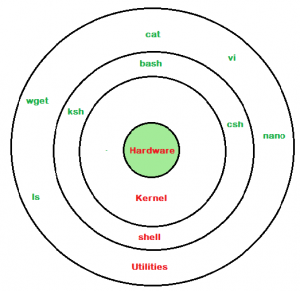
Shell意为“外壳”,对应 Linux 内核(kernel)。它是用户与 Linux 系统交互的命令解释器,负责:
- 接收用户输入;
- 解析命令;
- 查找需要执行的程序;
- 传递参数;
- 显示执行结果。
是用户与内核交互的命令行界面。Linux 常见 Shell 有:
- Bourne Shell (
/usr/bin/shor/bin/sh),简称sh - Bourne Again Shell (
/bin/bash),简称bash - C Shell(
/usr/bin/csh),简称csh - Korn Shell (
/usr/bin/ksh),简称ksh - Z Shell(
/usr/bin/zshor/bin/zsh)简称zsh
绝大多数 Linux 发行版默认使用 bash。
命令提示符
Linux 终端中通常会显示命令提示符(Prompt):
alice@linux101:~$
其格式通常为:
用户名@主机名:当前工作目录$
其字段含义为:
alice:当前登录用户名linux101:主机名~:当前用户户家目录$:普通用户提示符#:通常表示 root 用户
例如:
root 用户:
root@linux101:~#
$和#只是提示符标识,并不是命令的一部分。
命令基本结构
命令 [选项] [参数]
例如:
ls -l /tmp
解释:
ls:命令-l:选项/tmp:参数
https://explainshell.com/
终端基本操作
Tab自动补全- 上下方向键查看历史命令
Ctrl+C中断命令Ctrl+L清屏clear- 复制与粘贴
- 多行命令的基本识别
命令历史
history
history 10
- 历史命令可能包含敏感信息
- 不要在命令行中直接输入密码或令牌
man